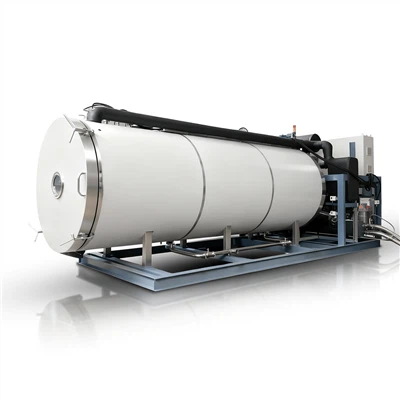
Hey there! As a supplier of batch production freeze dryers, I'm super stoked to share some tips on how to use the remote control function of these awesome machines. It's a game - changer, and once you get the hang of it, you'll wonder how you ever lived without it.
First off, let's talk about why the remote control function is so great. In a busy production environment, you don't always have the luxury of standing right next to the freeze dryer. Maybe you're in another part of the facility, or you're dealing with other urgent tasks. With the remote control, you can monitor and adjust the settings of your batch production freeze dryer from anywhere. This means you can keep an eye on the drying process, make changes on - the - fly, and ensure everything runs smoothly without constantly being physically present.
Setting Up the Remote Control
The first step is to make sure your freeze dryer is compatible with the remote control system. Most of our Batch Freeze Drying Machine models come with a built - in remote - control feature that's easy to set up. You'll need to connect the freeze dryer to your local network. Usually, this involves plugging an Ethernet cable into the machine or connecting it to your Wi - Fi network.
Once the physical connection is made, you'll need to download the corresponding app on your smartphone or tablet. Our app is available for both iOS and Android devices. After downloading, open the app and follow the on - screen instructions to pair it with your freeze dryer. You'll be asked to enter some basic information about the machine, like its serial number, and then you'll be all set to start using the remote control.
Monitoring the Freeze - Drying Process
One of the most useful features of the remote control is the ability to monitor the freeze - drying process in real - time. When you open the app, you'll see a dashboard that displays all the important information about your Vial Production Freeze Dryer. This includes the temperature inside the drying chamber, the pressure, and the progress of the drying cycle.
You can also view historical data on the app. This is great for analyzing past drying cycles, identifying any patterns or issues, and making improvements for future batches. For example, if you notice that the temperature fluctuates too much during a certain stage of the process, you can use this information to adjust the settings for the next batch.
Adjusting Settings Remotely
Another cool thing about the remote control is that you can adjust the settings of the freeze dryer without having to be there in person. Let's say you realize that the drying time needs to be extended. Instead of going all the way to the machine, you can simply open the app and change the drying time setting.
You can also adjust the temperature and pressure settings. This is especially useful if you're working with different types of products that require specific drying conditions. For instance, some products may need a lower temperature to preserve their quality, while others can handle a higher temperature for a faster drying process. With the remote control, you can make these adjustments quickly and easily.
Troubleshooting with the Remote Control
The remote control can also be a big help when it comes to troubleshooting. If the freeze dryer encounters an issue, it will send an alert to your app. The alert will include a description of the problem, such as a temperature sensor malfunction or a pressure drop.
You can then use the app to check the status of the machine and see if there are any error codes. In some cases, you may be able to fix the problem remotely by resetting certain settings or running a diagnostic test. If the issue is more serious, you can use the app to contact our technical support team. They can access the machine's data remotely and help you resolve the problem as quickly as possible.
Safety Precautions
While the remote control function is incredibly convenient, it's important to take some safety precautions. Make sure you keep your app password - protected to prevent unauthorized access. Also, always double - check the settings you're changing on the app to avoid any mistakes that could affect the quality of the dried products or damage the machine.
Benefits of Using Remote Control for Different Types of Batch Production Freeze Dryers
Let's take a closer look at how the remote control function benefits different types of our batch production freeze dryers. For our Silicone Oil Freeze Dryer for Batch Production, the remote control allows you to precisely monitor the silicone oil temperature. This is crucial because the silicone oil plays a key role in transferring heat during the freeze - drying process.


In the case of the vial production freeze dryer, the remote control helps you keep track of the individual vials' drying progress. You can ensure that each vial is being dried evenly, which is essential for maintaining product consistency.
Tips for Optimal Remote Control Use
To get the most out of the remote control function, here are some tips. First, make sure your device has a stable internet connection. A weak or intermittent connection can cause delays in receiving alerts or updating the settings.
Second, familiarize yourself with all the features of the app. There may be some hidden gems that you're not aware of, like customizing the dashboard to display only the information you need.
Finally, regularly update the app to ensure you have access to the latest features and security patches.
Conclusion
In conclusion, the remote control function of our batch production freeze dryers is a powerful tool that can greatly improve your productivity and efficiency. It allows you to monitor, adjust, and troubleshoot your freeze dryer from anywhere, at any time.
If you're interested in learning more about our batch production freeze dryers or want to discuss how the remote control function can benefit your specific production needs, don't hesitate to reach out. We're here to help you make the most of this amazing technology and ensure that your freeze - drying process runs smoothly.
References
- Manufacturer's manual for batch production freeze dryers
- Technical documentation on remote control systems for freeze dryers